Reassign Participants
To transfer a booking to a different course, open the booking and navigate to the tab: Booking details. There, you will see a button labeled Alter Applications. Click this button, select the course to which you wish to transfer the booking, and confirm the transfer by clicking "OK."
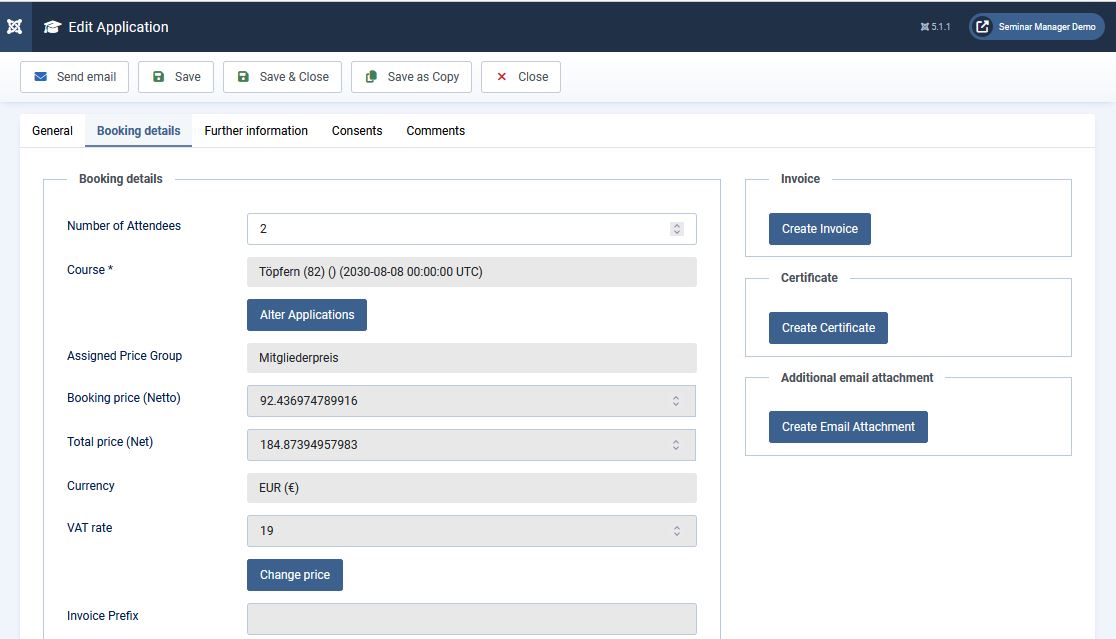
Please note—this is crucial—that the price from the original course is carried over to the new course; therefore, you must manually adjust the price. The following message will also appear during the transfer process:
"Course has been changed. All selected applications will be copied for the new course and will be canceled for the old course. If you perform a rebooking, the booking price of the original booking is taken over. To change that price to a price that fits to the new course, you will have to edit the booking: Choose the respective price group and press the save button. Create an invoice only after saving the correct price group for the rebooking."